<?xml version="1.0" encoding="utf-8"?><feed xmlns="http://www.w3.org/2005/Atom" xml:lang="en"><generator uri="https://jekyllrb.com/" version="3.10.0">Jekyll</generator><link href="https://yizhouwang.net/feed.xml" rel="self" type="application/atom+xml" /><link href="https://yizhouwang.net/" rel="alternate" type="text/html" hreflang="en" /><updated>2026-06-05T14:06:37+00:00</updated><id>https://yizhouwang.net/feed.xml</id><title type="html">Yizhou Wang</title><subtitle>Personal homepage of Yizhou Wang, Senior Deep Learning Engineer at NVIDIA and Ph.D. in Electrical &amp; Computer Engineering from the University of Washington. Research in computer vision, autonomous driving, 3D perception, multi-object tracking, and sensor fusion.</subtitle><author><name>Yizhou Wang</name><email>joeyyzwang@gmail.com</email></author><entry><title type="html">Monocular Visual Object 3D Localization in Road Scenes</title><link href="https://yizhouwang.net/blog/2019/07/15/object-3d-localization/" rel="alternate" type="text/html" title="Monocular Visual Object 3D Localization in Road Scenes" /><published>2019-07-15T00:00:00+00:00</published><updated>2019-07-15T00:00:00+00:00</updated><id>https://yizhouwang.net/blog/2019/07/15/object-3d-localization</id><content type="html" xml:base="https://yizhouwang.net/blog/2019/07/15/object-3d-localization/"><![CDATA[<p>This is a paper published at ACM Multimedia 2019 (Long Oral). 
<a href="https://doi.org/10.1145/3343031.3350924">[PDF Available Here]</a></p>

<div class="video-container">
<iframe class="video" src="https://www.youtube.com/embed/r3x8OhNDnSA" frameborder="0" allow="accelerometer; autoplay; encrypted-media; gyroscope; picture-in-picture" allowfullscreen=""></iframe>
</div>
<p><br /></p>

<h2 id="problems-to-solve">Problems to Solve</h2>
<ul>
  <li>Accurately localize the 3D positions of the objects in videos captured by a camera mounted on an autonomous vehicle.</li>
  <li>Adaptively estimate ground plane of each frame for more robust object 3D localization.</li>
</ul>

<h2 id="framework">Framework</h2>

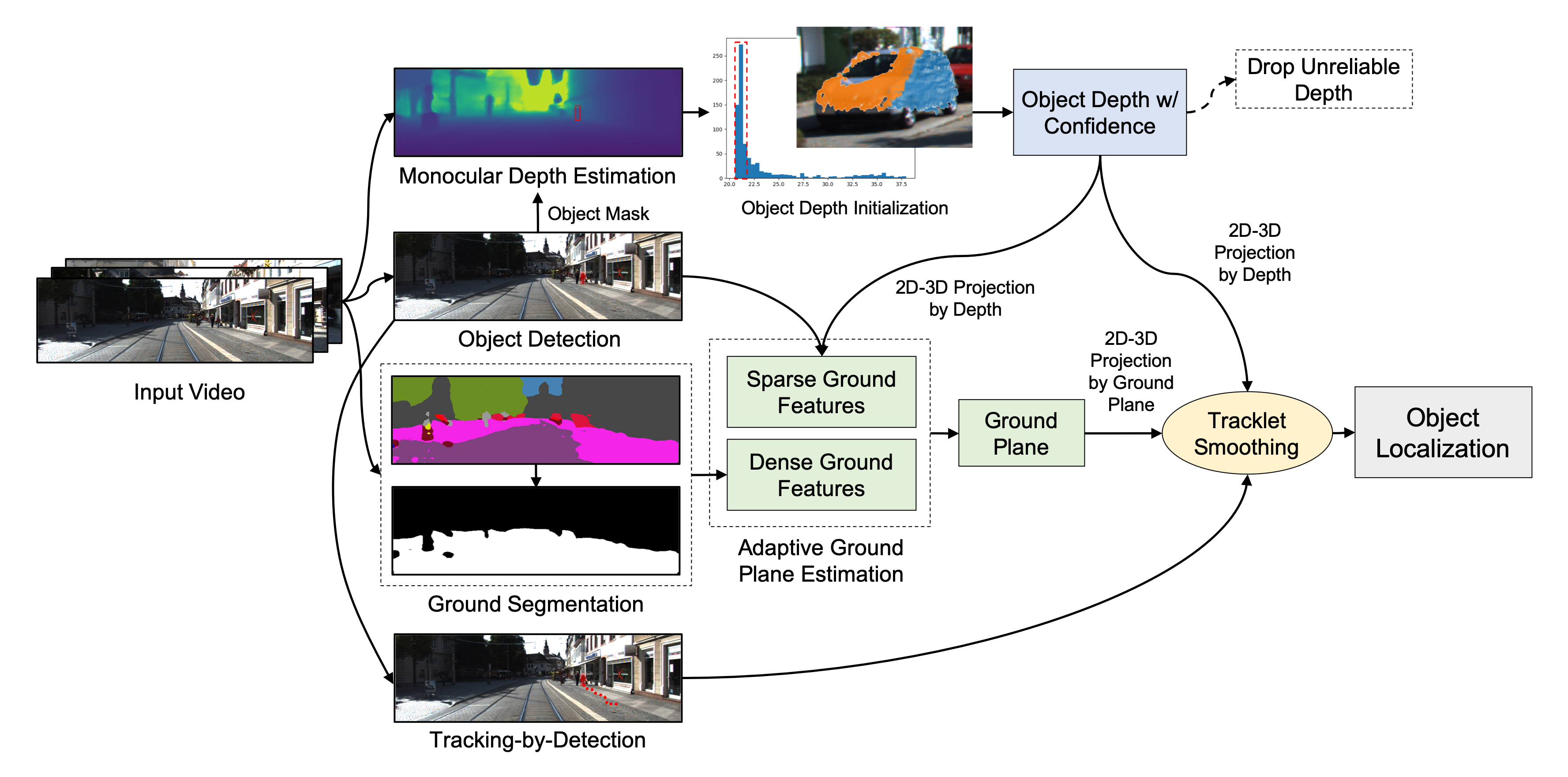
<p><img src="/images/2019-07-15-object-3d-localization/overallflow.png" class="img-responsive" alt="framework" /></p>

<ul>
  <li>Monocular depth estimation or other 3D sensors to obtain depth information.</li>
  <li>Object depth histogram analysis or 3D point cloud clustering for object depth initialization.</li>
  <li>Adaptive ground plane estimation taking advantage of sparse and dense ground features.</li>
  <li>Tracklet smoothing using the results from multi-object tracking.</li>
</ul>

<h2 id="quantitative-results">Quantitative Results</h2>

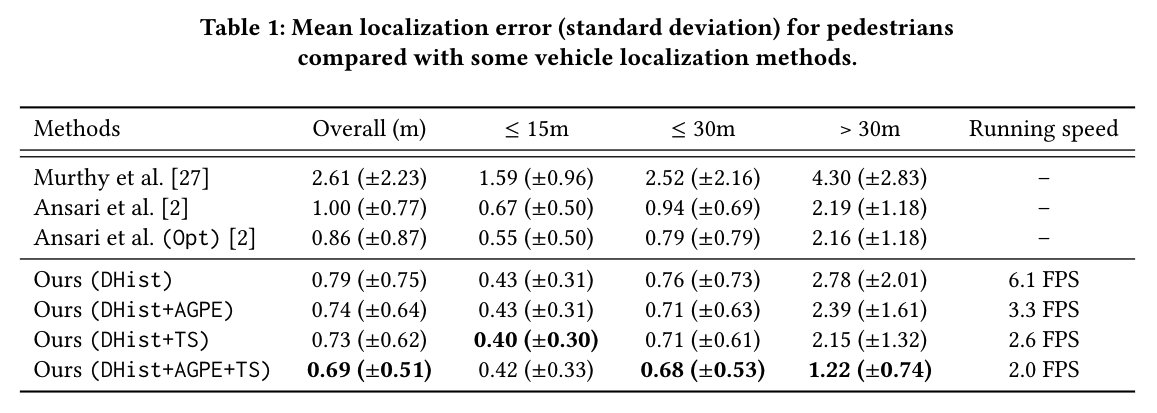
<p>Localization error and time complexity for pedestrians localization on KITTI dataset.</p>

<p><img src="/images/2019-07-15-object-3d-localization/ped_res.png" class="img-responsive" alt="pedestrian results" style="width:100%;" /></p>

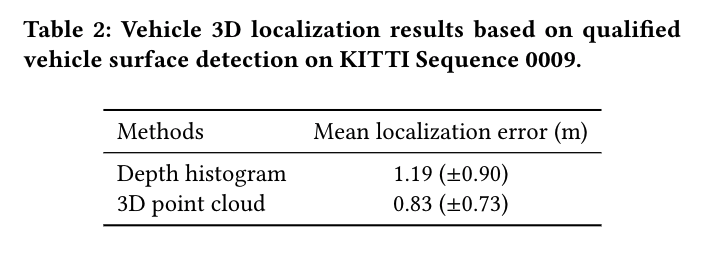
<p>Localization error for vehicle localization on KITTI dataset.</p>

<p><img src="/images/2019-07-15-object-3d-localization/veh_res.png" class="img-responsive" alt="vehicle results" style="width:60%;" /></p>

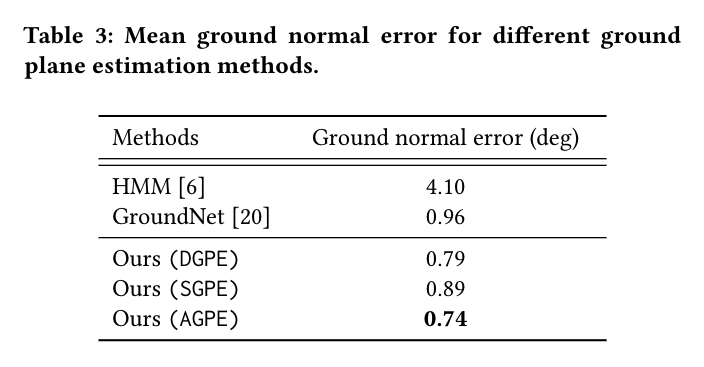
<p>Ground plane estimation results.</p>

<p><img src="/images/2019-07-15-object-3d-localization/gpe_res.png" class="img-responsive" alt="ground plane estimation results" style="width:60%;" /></p>

<h2 id="qualitative-results">Qualitative Results</h2>

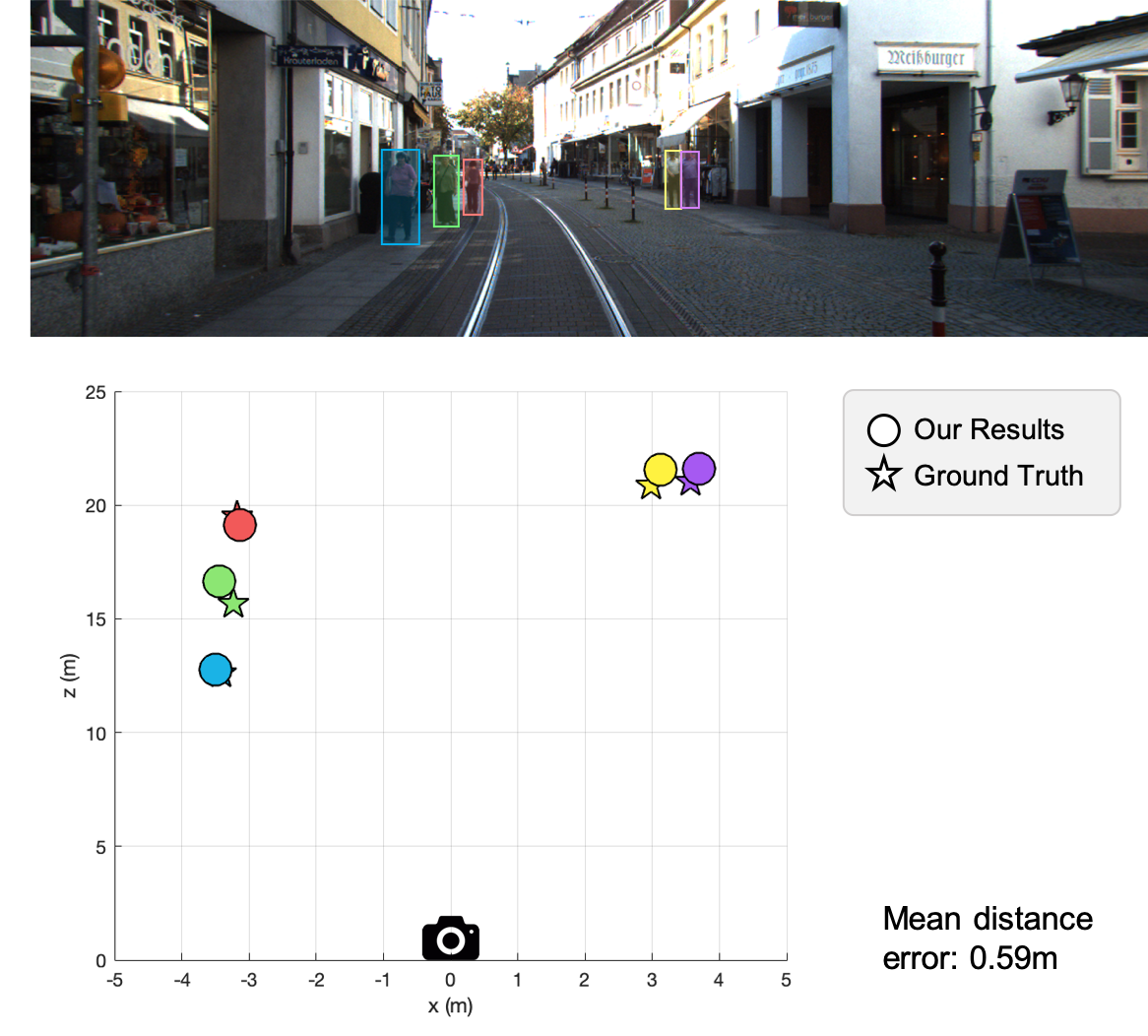
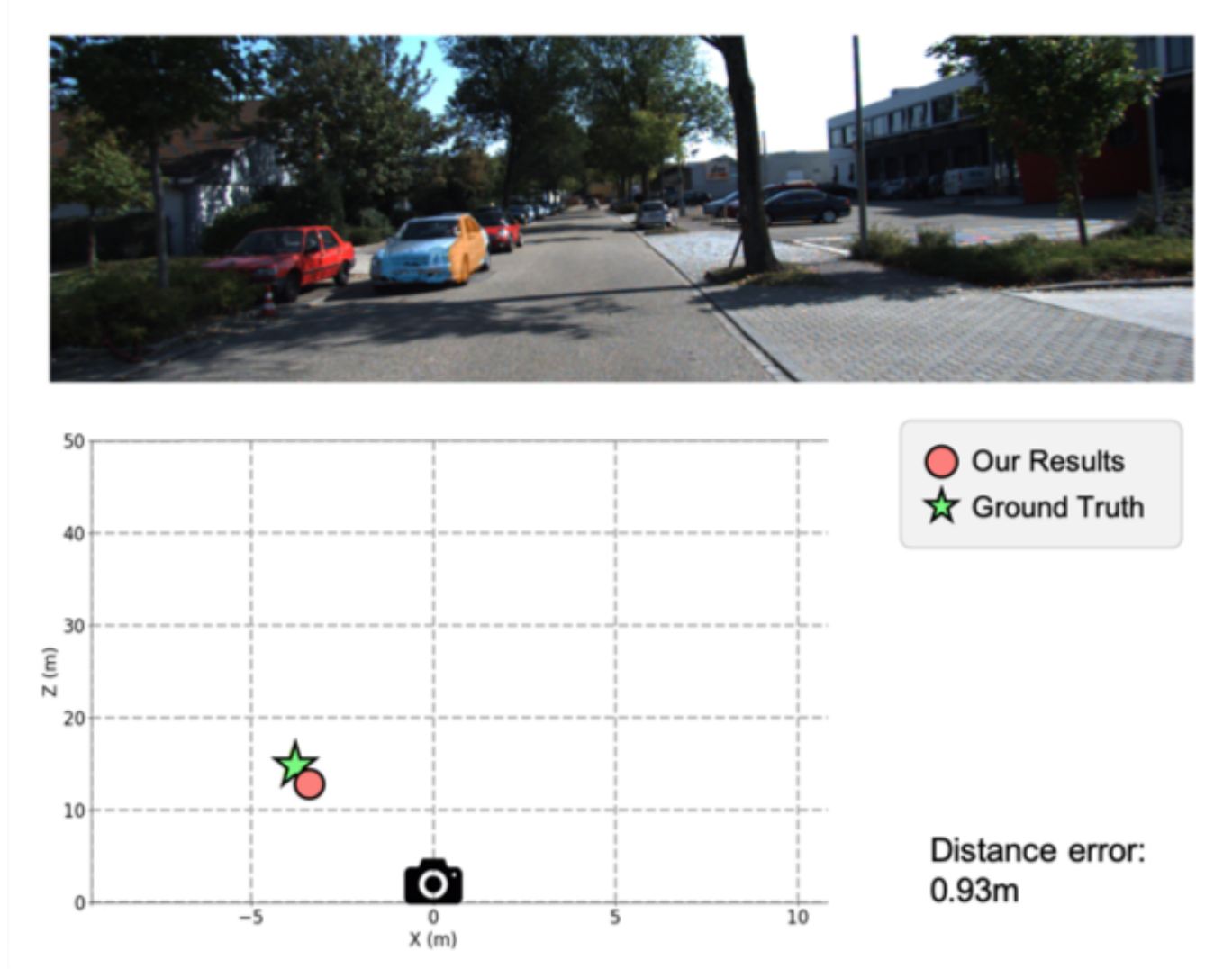
<p>Example results for pedestrian and vehicle 3D localization.</p>

<p><img src="/images/2019-07-15-object-3d-localization/ped_res_eg.png" class="img-responsive" alt="pedestrian results" style="width:60%;" /></p>

<p><img src="/images/2019-07-15-object-3d-localization/veh_res_eg.png" class="img-responsive" alt="pedestrian results" style="width:60%;" /></p>

<p><br /></p>

<p><em>Please refer our paper published in ACM Multimedia 2019:</em></p>

<figure class="highlight"><pre><code class="language-text" data-lang="text">@inproceedings{wang2019monocular,
  title={Monocular Visual Object 3D Localization in Road Scenes},
  author={Wang, Yizhou and Huang, Yen-Ting and Hwang, Jenq-Neng},
  booktitle={Proceedings of the 27th ACM International Conference on Multimedia},
  pages={917--925},
  year={2019},
  organization={ACM}
}</code></pre></figure>]]></content><author><name>Yizhou Wang, Yen-Ting Huang, Jenq-Neng Hwang</name></author><category term="object-localization" /><category term="mask-rcnn" /><category term="depth-estimation" /><category term="ground-plane-estimation" /><category term="multi-object-tracking" /><category term="kitti" /><summary type="html"><![CDATA[3D localization of objects in road scenes is important for autonomous driving and advanced driver-assistance systems (ADAS). However, with common monocular camera setups, 3D information is difficult to obtain. In this paper, we propose a novel and robust method for 3D localization of monocular visual objects in road scenes by joint integration of depth estimation, ground plane estimation, and multi-object tracking techniques.]]></summary></entry><entry><title type="html">Object Detection on KITTI dataset using YOLO and Faster R-CNN</title><link href="https://yizhouwang.net/blog/2018/12/20/object-detection-kitti/" rel="alternate" type="text/html" title="Object Detection on KITTI dataset using YOLO and Faster R-CNN" /><published>2018-12-20T00:00:00+00:00</published><updated>2018-12-20T00:00:00+00:00</updated><id>https://yizhouwang.net/blog/2018/12/20/object-detection-kitti</id><content type="html" xml:base="https://yizhouwang.net/blog/2018/12/20/object-detection-kitti/"><![CDATA[<p>This post is going to describe object detection on 
<a href="https://www.cvlibs.net/datasets/kitti/">KITTI dataset</a> 
using three <em>retrained</em> object detectors: <strong>YOLOv2</strong>, <strong>YOLOv3</strong>, <strong>Faster R-CNN</strong> 
and compare their performance evaluated by uploading the results to KITTI evaluation server.</p>

<p>Note that there is a previous post about the details for YOLOv2 
(<a href="https://yizhouwang.net/blog/2018/07/29/train-yolov2-kitti/">click here</a>). 
YOLOv3 implementation is almost the same with YOLOv3, so that I will skip some steps. 
Please refer to the previous post to see more details.</p>

<h2 id="prepare-kitti-dataset">Prepare KITTI dataset</h2>

<p>We used <a href="https://www.cvlibs.net/datasets/kitti/eval_object.php?obj_benchmark=2d">KITTI object 2D</a> for training YOLO and used <a href="https://www.cvlibs.net/datasets/kitti/raw_data.php">KITTI raw data</a> for test. Some of the test results are recorded as the demo video above.</p>

<h3 id="download-data-and-labels">Download data and labels</h3>

<p>Download <a href="https://www.cvlibs.net/download.php?file=data_object_image_2.zip">KITTI object 2D left color images of object data set (12 GB)</a> and submit your email address to get the download link. 
Download <a href="https://www.cvlibs.net/download.php?file=data_object_label_2.zip">training labels of object data set (5 MB)</a>. Unzip them to your customized directory <code class="language-plaintext highlighter-rouge">&lt;data_dir&gt;</code> and <code class="language-plaintext highlighter-rouge">&lt;label_dir&gt;</code>.</p>

<h3 id="convert-kitti-labels">Convert KITTI labels</h3>

<p>To simplify the labels, we combined 9 original KITTI labels into 6 classes:</p>

<figure class="highlight"><pre><code class="language-text" data-lang="text">Car
Van
Truck
Tram
Pedestrian
Cyclist</code></pre></figure>

<p>Be careful that YOLO needs the bounding box format as <code class="language-plaintext highlighter-rouge">(center_x, center_y, width, height)</code>, 
instead of using typical format for KITTI.</p>

<h2 id="yolo-configurations">YOLO configurations</h2>

<p>YOLO source code is available <a href="https://github.com/yizhou-wang/darknet-kitti">here</a>. 
To train YOLO, beside training data and labels, we need the following documents: 
<code class="language-plaintext highlighter-rouge">kitti.data</code>, <code class="language-plaintext highlighter-rouge">kitti.names</code>, and <code class="language-plaintext highlighter-rouge">kitti-yolovX.cfg</code>. 
The data and name files is used for feeding directories and variables to YOLO. 
The configuration files <code class="language-plaintext highlighter-rouge">kittiX-yolovX.cfg</code> for training on KITTI is located at</p>
<ul>
  <li>YOLOv2: <a href="https://github.com/yizhou-wang/darknet-kitti/blob/master/cfg/kitti6-yolov2.cfg"><code class="language-plaintext highlighter-rouge">/darknet/cfg/kitti6-yolov2.cfg</code></a></li>
  <li>YOLOv3: <a href="https://github.com/yizhou-wang/darknet-kitti/blob/master/cfg/kitti6-yolov3.cfg"><code class="language-plaintext highlighter-rouge">/darknet/cfg/kitti6-yolov3.cfg</code></a></li>
</ul>

<h3 id="details-of-configurations">Details of configurations</h3>

<p>Open the configuration file <code class="language-plaintext highlighter-rouge">yolovX-voc.cfg</code> and change the following parameters:</p>

<figure class="highlight"><pre><code class="language-yml" data-lang="yml"><span class="pi">[</span><span class="nv">net</span><span class="pi">]</span>
<span class="c1"># Training</span>
<span class="s">batch=64</span>
<span class="s">subdivisions=8</span>
<span class="s">height=370</span>
<span class="s">width=1224</span>

<span class="pi">[</span><span class="nv">region</span><span class="pi">]</span>
<span class="s">classes=6</span>

<span class="s">random=0</span>  <span class="c1"># remove resizing step</span></code></pre></figure>

<p>Note that I removed resizing step in YOLO and compared the results. 
The reason for this is described in the 
<a href="(https://yizhouwang.net/blog/2018/07/29/train-yolov2-kitti/)">previous post</a>.</p>

<p>Also, remember to change the <code class="language-plaintext highlighter-rouge">filters</code> in <strong>YOLOv2</strong>’s last convolutional layer 
to be \(\texttt{filters} = ((\texttt{classes} + 5) \times \texttt{num})\), so that</p>

<figure class="highlight"><pre><code class="language-yml" data-lang="yml"><span class="c1"># last convolutional layer</span>
<span class="pi">[</span><span class="nv">convolutional</span><span class="pi">]</span>
<span class="s">filters=55</span></code></pre></figure>

<p>For <strong>YOLOv3</strong>, change the <code class="language-plaintext highlighter-rouge">filters</code> in <strong>three <code class="language-plaintext highlighter-rouge">yolo</code> layers</strong> as
\(\texttt{filters} = ((\texttt{classes} + 5) \times 3)\), so that</p>

<figure class="highlight"><pre><code class="language-yml" data-lang="yml"><span class="c1"># do the same thing for the 3 yolo layers</span>
<span class="pi">[</span><span class="nv">convolutional</span><span class="pi">]</span>
<span class="s">filters=33</span></code></pre></figure>

<p>You can also refine some other parameters like <code class="language-plaintext highlighter-rouge">learning_rate</code>, <code class="language-plaintext highlighter-rouge">object_scale</code>, <code class="language-plaintext highlighter-rouge">thresh</code>, etc. to obtain even better results.</p>

<h2 id="faster-r-cnn-configurations">Faster R-CNN Configurations</h2>

<p>To train Faster R-CNN, we need to transfer training images and  labels as the input format for TensorFlow 
called <code class="language-plaintext highlighter-rouge">tfrecord</code> (using TensorFlow provided the scripts). 
Typically, Faster R-CNN is well-trained if the loss drops below 0.1. 
After the model is trained, we need to transfer the model to a <code class="language-plaintext highlighter-rouge">frozen graph</code> defined in TensorFlow 
to do detection inference. 
For testing, I also write a script to save the detection results including quantitative results and 
images with detected bounding boxes.</p>

<p>For this part, you need to install <a href="https://github.com/tensorflow/models/blob/master/research/object_detection">TensorFlow object detection API</a>
and I write some tutorials here to help installation and training.</p>

<p>Firstly, we need to clone <code class="language-plaintext highlighter-rouge">tensorflow/models</code> from GitHub and install this package according to the 
<a href="https://github.com/tensorflow/models/blob/master/research/object_detection/g3doc/installation.md">official installation tutorial</a>.</p>

<p>After the package is installed, we need to prepare the training  dataset, i.e., 
converting dataset to <code class="language-plaintext highlighter-rouge">tfrecord</code> files:</p>

<figure class="highlight"><pre><code class="language-shell" data-lang="shell">python object_detection/dataset_tools/create_kitti_tf_record.py <span class="se">\</span>
    <span class="nt">--data_dir</span><span class="o">=</span>&lt;dataset-root&gt;/object_2d <span class="se">\</span>
    <span class="nt">--output_path</span><span class="o">=</span>/mnt/disk1/kitti-dataset/object_2d/faster-rcnn/kitti <span class="se">\</span>
    <span class="nt">--classes_to_use</span><span class="o">=</span>car ,van ,truck ,pedestrian ,cyclist ,tram ,dontcare <span class="se">\</span>
    <span class="nt">--label_map_path</span><span class="o">=</span>/mnt/disk1/kitti-dataset/object_2d/faster-rcnn/kitti_label_map.pbtxt</code></pre></figure>

<p>Then, start to train Faster R-CNN:</p>

<figure class="highlight"><pre><code class="language-shell" data-lang="shell">python object_detection/legacy/train.py <span class="se">\</span>
    <span class="nt">--train_dir</span><span class="o">=</span>&lt;tensorflow-dir&gt;/models/ <span class="se">\</span>
    <span class="nt">--pipeline_config_path</span><span class="o">=</span>&lt;object-detection-api-dir&gt;/samples/configs/faster_rcnn_resnet101_kitti.config <span class="se">\</span></code></pre></figure>

<p>When training is completed, we need to export the weights to a <code class="language-plaintext highlighter-rouge">frozengraph</code>:</p>

<figure class="highlight"><pre><code class="language-shell" data-lang="shell">python object_detection/export_inference_graph.py <span class="se">\</span>
    <span class="nt">--input_type</span><span class="o">=</span>image_tensor <span class="se">\ </span>
    <span class="nt">--pipeline_config_path</span><span class="o">=</span>&lt;object-detection-api-dir&gt;/samples/configs/faster_rcnn_resnet101_kitti.config <span class="se">\</span>
    <span class="nt">--trained_checkpoint_prefix</span><span class="o">=</span>&lt;checkpoint-dir&gt;/model.ckpt-58093 <span class="se">\</span>
    <span class="nt">--output_directory</span><span class="o">=</span>&lt;graph-dir&gt;/graph</code></pre></figure>

<p>Finally, we can test and save detection results on KITTI testing dataset using the demo 
written in Jupyter Notebook: <code class="language-plaintext highlighter-rouge">fasterrcnn/objectdetection/objectdetectiontutorial.ipynb</code>.</p>

<h2 id="evaluation-results">Evaluation results</h2>

<p>For object detection, people often use a metric called <strong>mean average precision (mAP)</strong> 
to evaluate the performance of a detection algorithm. 
mAP is defined as the average of the maximum precision at different recall values.
I use the original KITTI evaluation tool and this GitHub repository [1] to calculate mAP 
and evaluate the performance of object detection models.<br />
Moreover, I also count the time consumption for each detection algorithms. 
Note that the KITTI evaluation tool only cares about object detectors for the classes
<code class="language-plaintext highlighter-rouge">Car</code>, <code class="language-plaintext highlighter-rouge">Pedestrian</code>, and <code class="language-plaintext highlighter-rouge">Cyclist</code> but do not count <code class="language-plaintext highlighter-rouge">Van</code>, etc. as false positives for cars.</p>

<h3 id="quantitative-results-for-yolov2">Quantitative results for YOLOv2</h3>

<p>The results of mAP for KITTI using original YOLOv2 <strong>with input resizing</strong>.</p>

<table style="width: 80%;">
  <col width="20%" />
  <col width="20%" />
  <col width="20%" />
  <col width="20%" />
  <thead>
    <tr>
      <th>Benchmark</th>
      <th>Easy</th>
      <th>Moderate</th>
      <th>Hard</th>
    </tr>
  </thead>
  <tbody>
    <tr>
      <td>Car</td>
      <td>45.32%</td>
      <td>28.42%</td>
      <td>12.97%</td>
    </tr>
    <tr>
      <td>Pedestrian</td>
      <td>18.34%</td>
      <td>13.90%</td>
      <td>9.81%</td>
    </tr>
    <tr>
      <td>Cyclist</td>
      <td>8.71%</td>
      <td>5.40%</td>
      <td>3.02%</td>
    </tr>
  </tbody>
</table>

<p>The results of mAP for KITTI using modified YOLOv2 <strong>without input resizing</strong>.</p>

<table style="width: 80%;">
  <col width="20%" />
  <col width="20%" />
  <col width="20%" />
  <col width="20%" />
  <thead>
    <tr>
      <th>Benchmark</th>
      <th>Easy</th>
      <th>Moderate</th>
      <th>Hard</th>
    </tr>
  </thead>
  <tbody>
    <tr>
      <td>Car</td>
      <td>88.17%</td>
      <td>78.70%</td>
      <td>69.45%</td>
    </tr>
    <tr>
      <td>Pedestrian</td>
      <td>60.44%</td>
      <td>43.69%</td>
      <td>43.06%</td>
    </tr>
    <tr>
      <td>Cyclist</td>
      <td>55.00%</td>
      <td>39.29%</td>
      <td>32.58%</td>
    </tr>
  </tbody>
</table>

<h3 id="quantitative-results-for-yolov3">Quantitative results for YOLOv3</h3>

<p>The results of mAP for KITTI using modified YOLOv3 <strong>without input resizing</strong>.</p>

<table style="width: 80%;">
  <col width="20%" />
  <col width="20%" />
  <col width="20%" />
  <col width="20%" />
  <thead>
    <tr>
      <th>Benchmark</th>
      <th>Easy</th>
      <th>Moderate</th>
      <th>Hard</th>
    </tr>
  </thead>
  <tbody>
    <tr>
      <td>Car</td>
      <td>56.00%</td>
      <td>36.23%</td>
      <td>29.55%</td>
    </tr>
    <tr>
      <td>Pedestrian</td>
      <td>29.98%</td>
      <td>22.84%</td>
      <td>22.21%</td>
    </tr>
    <tr>
      <td>Cyclist</td>
      <td>9.09%</td>
      <td>9.09%</td>
      <td>9.09%</td>
    </tr>
  </tbody>
</table>

<h3 id="quantitative-results-for-faster-r-cnn">Quantitative results for Faster R-CNN</h3>

<p>The results of mAP for KITTI using <strong>retrained</strong> Faster R-CNN.</p>

<table style="width: 80%;">
  <col width="20%" />
  <col width="20%" />
  <col width="20%" />
  <col width="20%" />
  <thead>
    <tr>
      <th>Benchmark</th>
      <th>Easy</th>
      <th>Moderate</th>
      <th>Hard</th>
    </tr>
  </thead>
  <tbody>
    <tr>
      <td>Car</td>
      <td>84.81%</td>
      <td>86.18%</td>
      <td>78.03%</td>
    </tr>
    <tr>
      <td>Pedestrian</td>
      <td>76.52%</td>
      <td>59.98%</td>
      <td>51.84%</td>
    </tr>
    <tr>
      <td>Cyclist</td>
      <td>74.72%</td>
      <td>56.83%</td>
      <td>49.60%</td>
    </tr>
  </tbody>
</table>

<h3 id="qualitative-results">Qualitative results</h3>

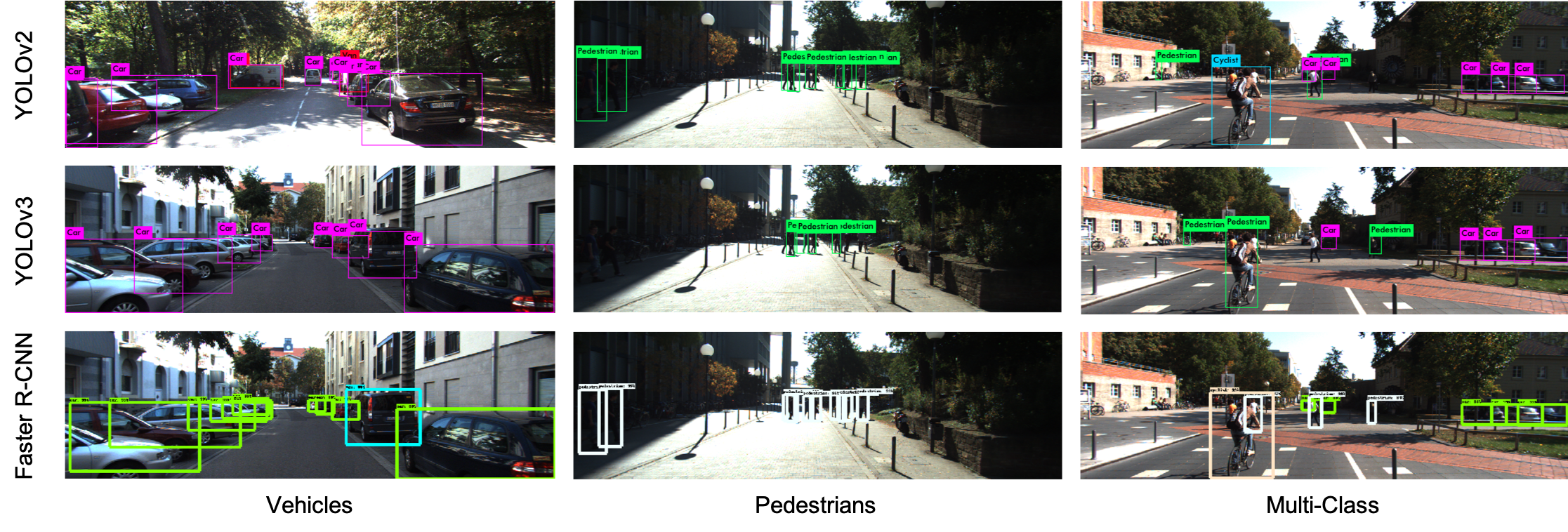
<p>The following figure shows some example testing results using these three models. I select three typical road scenes in KITTI which contains many vehicles, pedestrains and multi-class objects respectively.</p>

<p><img src="/images/2018-12-20-object-detection-kitti/viz-res.png" class="img-responsive" alt="qualitative-results" /></p>

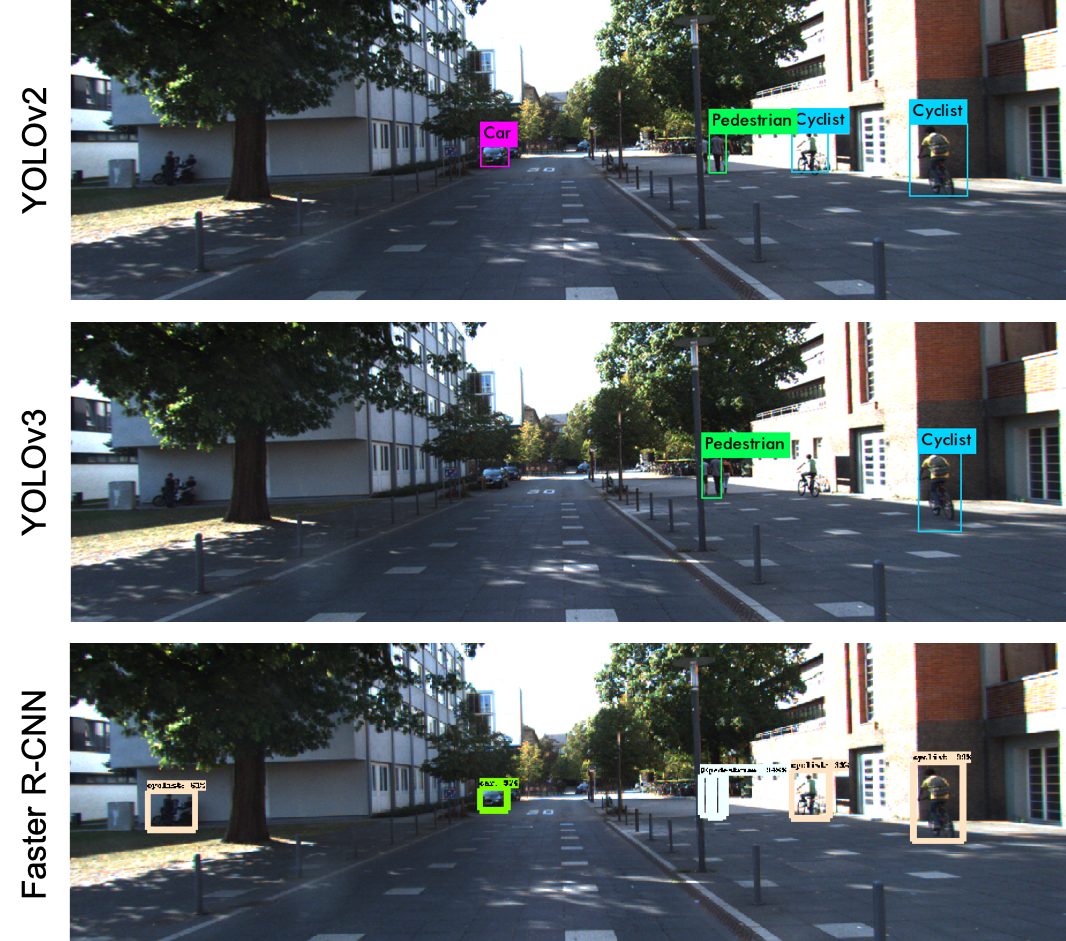
<p>The following figure shows a result that Faster R-CNN performs much better than the two YOLO models. In this example, YOLO cannot detect the people on left-hand side and can only detect one pedestrian on the right-hand side, while Faster R-CNN can detect multiple pedestrians on the right-hand side.</p>

<p><img src="/images/2018-12-20-object-detection-kitti/viz-res-bad.png" class="img-responsive" alt="comparison-results" style="width:50%;" /></p>

<h3 id="execution-time-analysis">Execution time analysis</h3>

<p>I also analyze the execution time for the three models. YOLOv2 and YOLOv3 are claimed as real-time detection models so that for KITTI, they can finish object detection less than 40 ms per image. While YOLOv3 is a little bit slower than YOLOv2. However, Faster R-CNN is much slower than YOLO (although it named “faster”). Thus, Faster R-CNN cannot be used in the real-time tasks like autonomous driving although its performance is much better.</p>

<table style="width: 60%;">
  <col width="20%" />
  <col width="40%" />
  <thead>
    <tr>
      <th>Model</th>
      <th>Inference Time (per frame)</th>
    </tr>
  </thead>
  <tbody>
    <tr>
      <td>YOLOv2</td>
      <td>15 ms</td>
    </tr>
    <tr>
      <td>YOLOv3</td>
      <td>35 ms</td>
    </tr>
    <tr>
      <td>Faster R-CNN</td>
      <td>2763 ms</td>
    </tr>
  </tbody>
</table>

<p>BTW, I use NVIDIA Quadro GV100 for both training and testing.</p>

<h2 id="conclusion">Conclusion</h2>

<p>I implemented three kinds of object detection models, i.e., YOLOv2, YOLOv3, and Faster R-CNN, on KITTI 2D object detection dataset. During the implementation, I did the following:</p>

<ol>
  <li>pre-processed data and labels</li>
  <li>retrained and modified the models</li>
  <li>inferred testing results using retrained models</li>
  <li>evaluated the detection performance</li>
</ol>

<p>In conclusion, Faster R-CNN performs best on KITTI dataset. However, due to slow execution speed, it cannot be used in real-time autonomous driving scenarios.</p>]]></content><author><name>Yizhou Wang</name></author><category term="deep-learning" /><category term="object-detection" /><category term="kitti" /><category term="yolo" /><category term="faster-rcnn" /><summary type="html"><![CDATA[This post is going to describe object detection on KITTI dataset using three different detectors, YOLOv2, YOLOv3, Faster R-CNN and compare their performance evaluated by uploading the results to KITTI evaluation server.]]></summary></entry><entry><title type="html">Train YOLOv2 with KITTI dataset</title><link href="https://yizhouwang.net/blog/2018/07/29/train-yolov2-kitti/" rel="alternate" type="text/html" title="Train YOLOv2 with KITTI dataset" /><published>2018-07-29T00:00:00+00:00</published><updated>2018-07-29T00:00:00+00:00</updated><id>https://yizhouwang.net/blog/2018/07/29/train-yolov2-kitti</id><content type="html" xml:base="https://yizhouwang.net/blog/2018/07/29/train-yolov2-kitti/"><![CDATA[<p><strong>GitHub repository:</strong> https://github.com/yizhou-wang/darknet-kitti.</p>

<p><a href="https://www.cvlibs.net/datasets/kitti/">KITTI</a> dataset contains many real-world computer vision benchmarks for autonomous driving. There are many tasks including stereo, optical flow, visual odometry, 3D object detection and 3D tracking. <a href="https://pjreddie.com/darknet/yolov2/">YOLOv2</a> is a popular technique for real-time object detection. There are many pre-trained weights for many current image datasets. However, YOLOv2 doesn’t perform well on KITTI object dataset. In this post, I will explain how to train YOLOv2 with <a href="https://www.cvlibs.net/datasets/kitti/eval_object.php?obj_benchmark=2d">KITTI object dataset</a> and show some test results using our trained weights.</p>

<div class="video-container">
<iframe class="video" src="https://www.youtube.com/embed/_jZJKffAueA" frameborder="0" allow="autoplay; encrypted-media" allowfullscreen=""></iframe>
</div>
<p><br /></p>

<h2 id="prepare-kitti-dataset">Prepare KITTI dataset</h2>

<p>We used <a href="https://www.cvlibs.net/datasets/kitti/eval_object.php?obj_benchmark=2d">KITTI object 2D</a> for training YOLO and used <a href="https://www.cvlibs.net/datasets/kitti/raw_data.php">KITTI raw data</a> for test. Some of the test results are recorded as the demo video above.</p>

<h3 id="download-data-and-labels">Download data and labels</h3>

<p>Download <a href="https://www.cvlibs.net/download.php?file=data_object_image_2.zip">KITTI object 2D left color images of object data set (12 GB)</a> and submit your email address to get the download link. 
Download <a href="https://www.cvlibs.net/download.php?file=data_object_label_2.zip">training labels of object data set (5 MB)</a>. Unzip them to your customized directory <code class="language-plaintext highlighter-rouge">&lt;data_dir&gt;</code> and <code class="language-plaintext highlighter-rouge">&lt;label_dir&gt;</code>.</p>

<h3 id="convert-kitti-labels-to-yolo-labels">Convert KITTI labels to YOLO labels</h3>

<p>To simplify the labels, we combined 9 original KITTI labels into 6 classes:</p>

<figure class="highlight"><pre><code class="language-text" data-lang="text">Car
Van
Truck
Tram
Pedestrian
Cyclist</code></pre></figure>

<p><em>Need to refer the script from Zhichao.</em></p>

<h2 id="why-is-kitti-difficult-to-train-on-yolo">Why is KITTI difficult to train on YOLO?</h2>

<p>Many people tried to train YOLOv2 with KITTI dataset but often get really poor performance. <a href="https://www.cvlibs.net/datasets/kitti/eval_object_detail.php?&amp;result=e5d9b2c2b6530edca9fd0a052c82682c7232802a">This</a> is a typical result of YOLOv2 detection without doing any modification. <a href="https://www.cvlibs.net/datasets/kitti/eval_object_detail.php?&amp;result=2768413cc9f9ac91fc1f1d7d4afc9013e78d0eeb">This</a> is a YOLOv2 trained on 3 classes of KITTI dataset.</p>

<p><em>Why does YOLOv2 perform bad on KITTI unlike other datasets?</em> After review the basic properties of KITTI, we can find that the <strong>shape of the images</strong> is really wide: \(1224 \times 370\). However, the default input shape of YOLOv2 is \(416 \times 416\). After this kind of resizing, the bbox of the object would because really thin, and probably result in the bad performance. Moreover, the <strong>sizes of the objects</strong> in KITTI could be various. Some of the objects could be too small to be detected.</p>

<h2 id="configuration-settings">Configuration settings</h2>

<p>There are two ways of configuration:</p>
<ol>
  <li>Change the input shape of YOLOv2 model and disable random resizing.</li>
  <li>Modify the resizing code in YOLOv2 source code.</li>
</ol>

<h3 id="change-the-input-shape">Change the input shape</h3>

<p>Open the configuration file <code class="language-plaintext highlighter-rouge">yolov2-voc.cfg</code> and change the following parameters:</p>

<figure class="highlight"><pre><code class="language-yml" data-lang="yml"><span class="pi">[</span><span class="nv">net</span><span class="pi">]</span>
<span class="c1"># Training</span>
<span class="s">batch=64</span>
<span class="s">subdivisions=8</span>
<span class="s">height=370</span>
<span class="s">width=1224</span>

<span class="pi">[</span><span class="nv">region</span><span class="pi">]</span>
<span class="s">classes=6</span>

<span class="s">random=0</span></code></pre></figure>

<p>Also, remember to change the <code class="language-plaintext highlighter-rouge">filters</code> in the last convolutional layer to be \(\texttt{filters} = ((\texttt{classes} + 5) \times \texttt{num})\), so that</p>

<figure class="highlight"><pre><code class="language-yml" data-lang="yml"><span class="c1"># last convolutional layer</span>
<span class="pi">[</span><span class="nv">convolutional</span><span class="pi">]</span>
<span class="s">filters=55</span></code></pre></figure>

<p>You can also refine some other parameters like <code class="language-plaintext highlighter-rouge">learning_rate</code>, <code class="language-plaintext highlighter-rouge">object_scale</code>, <code class="language-plaintext highlighter-rouge">thresh</code>, etc. to obtain even better results.</p>

<p>Our configuration file <code class="language-plaintext highlighter-rouge">kitti6-yolov2.cfg</code> for KITTI with 6 classes can be found <a href="https://github.com/yizhou-wang/darknet-kitti/blob/master/cfg/kitti6-yolov2.cfg">HERE</a>.</p>

<h3 id="modify-the-resizing-code">Modify the resizing code</h3>

<p>Another way (refer to this <a href="https://groups.google.com/d/msg/darknet/HrkhOhxCgLk/fJGR8VrbBAAJ">post</a>) is to directly modify the resizing source code in <code class="language-plaintext highlighter-rouge">detector.c</code> 
<a href="https://github.com/yizhou-wang/darknet-kitti/blob/1d9ac102604234e3154bf61520a2503e386c5b63/examples/detector.c#L69">Line 69</a> 
and 
<a href="https://github.com/yizhou-wang/darknet-kitti/blob/1d9ac102604234e3154bf61520a2503e386c5b63/examples/detector.c#L79">Line 79</a>
to the following:</p>

<figure class="highlight"><pre><code class="language-c" data-lang="c"><span class="n">args</span><span class="p">.</span><span class="n">w</span> <span class="o">=</span> <span class="n">dim</span> <span class="o">*</span> <span class="mi">3</span><span class="p">;</span>    
<span class="n">resize_network</span><span class="p">(</span><span class="n">nets</span> <span class="o">+</span> <span class="n">i</span><span class="p">,</span> <span class="n">dim</span> <span class="o">*</span> <span class="mi">3</span><span class="p">,</span> <span class="n">dim</span><span class="p">);</span></code></pre></figure>

<p>Here, I use number 3 to represent the typical aspect ratio in KITTI dataset.</p>

<h2 id="evaluation-on-kitti">Evaluation on KITTI</h2>

<p>The results of mAP for KITTI using original YOLOv2 <strong>with input resizing</strong>.</p>

<table style="width: 80%;">
  <col width="20%" />
  <col width="20%" />
  <col width="20%" />
  <col width="20%" />
  <thead>
    <tr>
      <th>Benchmark</th>
      <th>Easy</th>
      <th>Moderate</th>
      <th>Hard</th>
    </tr>
  </thead>
  <tbody>
    <tr>
      <td>Car</td>
      <td>45.32%</td>
      <td>28.42%</td>
      <td>12.97%</td>
    </tr>
    <tr>
      <td>Pedestrian</td>
      <td>18.34%</td>
      <td>13.90%</td>
      <td>9.81%</td>
    </tr>
    <tr>
      <td>Cyclist</td>
      <td>8.71%</td>
      <td>5.40%</td>
      <td>3.02%</td>
    </tr>
  </tbody>
</table>

<p>The results of mAP for KITTI using modified YOLOv2 <strong>without input resizing</strong>.</p>

<table style="width: 80%;">
  <col width="20%" />
  <col width="20%" />
  <col width="20%" />
  <col width="20%" />
  <thead>
    <tr>
      <th>Benchmark</th>
      <th>Easy</th>
      <th>Moderate</th>
      <th>Hard</th>
    </tr>
  </thead>
  <tbody>
    <tr>
      <td>Car</td>
      <td>88.17%</td>
      <td>78.70%</td>
      <td>69.45%</td>
    </tr>
    <tr>
      <td>Pedestrian</td>
      <td>60.44%</td>
      <td>43.69%</td>
      <td>43.06%</td>
    </tr>
    <tr>
      <td>Cyclist</td>
      <td>55.00%</td>
      <td>39.29%</td>
      <td>32.58%</td>
    </tr>
  </tbody>
</table>

<h2 id="test-on-kitti-image-sequences">Test on KITTI image sequences</h2>

<p>I wrote several new functions in darknet, which can test YOLO performance for an image sequence. 
The file names of the image sequence should be listed in a <code class="language-plaintext highlighter-rouge">txt</code> file <code class="language-plaintext highlighter-rouge">&lt;namelist.txt&gt;</code>.</p>

<h3 id="test-an-image-sequence-testseq">Test an image sequence: <code class="language-plaintext highlighter-rouge">testseq</code></h3>

<figure class="highlight"><pre><code class="language-shell" data-lang="shell">./darknet detector testseq cfg/kitti.data cfg/kitti.cfg &lt;weights_file&gt; &lt;namelist.txt&gt; </code></pre></figure>

<h3 id="test-an-image-sequence-and-save-the-detection-results-twseq">Test an image sequence and save the detection results: <code class="language-plaintext highlighter-rouge">twseq</code></h3>

<figure class="highlight"><pre><code class="language-shell" data-lang="shell">./darknet detector twseq cfg/kitti.data cfg/kitti.cfg &lt;weights_file&gt; &lt;namelist.txt&gt; <span class="nt">-thresh</span> 0.5 <span class="nt">-show</span> 1</code></pre></figure>

<p>I also trained some models using <a href="https://pjreddie.com/darknet/yolo/">YOLOv3</a> and 
<a href="https://arxiv.org/abs/1506.01497">Faster R-CNN</a>. 
The performance and comparisons on KITTI is posted in the following post:</p>

<ul>
  <li><a href="https://yizhouwang.net/blog/2018/12/20/object-detection-kitti/">Object Detection on KITTI dataset using YOLO and Faster R-CNN</a></li>
</ul>]]></content><author><name>Yizhou Wang, Zhichao Lei</name></author><category term="deep-learning" /><category term="object-detection" /><category term="kitti" /><category term="yolo" /><summary type="html"><![CDATA[KITTI dataset contains many real-world computer vision benchmarks for autonomous driving. There are many tasks including stereo, optical flow, visual odometry, 3D object detection and 3D tracking. YOLOv2 is a popular technique for real-time object detection. There are many pre-trained weights for many current image datasets. However, YOLOv2 doesn't perform well on KITTI object dataset.]]></summary></entry></feed>